User`s guide
Manuals
Brands
Epson Manuals
Printer
B 310N
141
142
143
144
145
146
147
148
149
150
3.
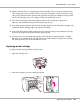
Remove the expended installed ink cartridge.
Note:
Hold the printer with your hand when you r
emove the ink cartridge.
4.
Remove the new ink cartridge from the package.
B-310N/B-510DN User’s Guide
Replacing Consumables
143
1
...
...
141
142
143
144
145
...
...
217