
User guide



1 Overview
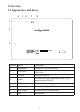
1.1 Appearance and Keys
Symbol Name
1
2
Power
3
4
5
6
7
8
TF Card
DC-5V
Descripon
Micro USB port Connect with PC and OTG funcon
Micro SD Card slot
for thePower socket charging device
VOL+/VOL-
VOL+/VOL-
1
1
2
3
DC-5V
MIC
4 5 6 7 8
Press quick to enter sleep/wake mode, hold
o
switch ON/OFF
down t
1
Mini HDMI
Connect to a mini HDMI cable
MIC Microphone
Headphone Connect to Stereo headphone