
LM-1702 LCD Monitor Quick Installation Guide

7
Customizing
your
Monitor
The
On
Screen
Display
(OSD)
system
provide
s
a
full
range
of
customizable
tools
to
optimize
your
display
.
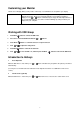
Important:
While
full
customization
is
available,
we
strongly
recommend
using
the
Auto
Adjustment
function,
which
is
preset
to
fully
optimize
your
monitor
’
s
performance.
Simply
press
the
&
buttons
simultaneously
to
engage
the Auto
Adjustment.
It
is
also
recommended
that
you
execute
the
function
following
any
change
made
to
your
display
from
your
computer.
W
orking
with
OSD
Group
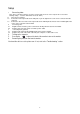
1.
Press
Menu button
to
activate
the
OSD
menu.
2.
Select
the
icon
from
the
OSD
menu
with
the
&
buttons.
3.
Press
Menu
button
to
confirm
the
selection
of
a
specific
functio
n
4.
Press
o
r
to
adjust
the
setting
values.
5.
Press
Menu
button
to
exit
from
the
sub-menu.
6.
Press
o
r
to
select
the
Exit
icon,
and
then
press
the
Menu
button
to
exit
from
the
OSD
menu.
Introduction to Hotkeys
1. Auto
Adjustment
While
the
OSD
menu
is
not
shown,
press
&
buttons
simultaneously
to
optimize
the
picture
performance
automatically
(Y
ou
may
also
use
the
OSD
control
to
activate
the
Auto
Adjustment
function.
See
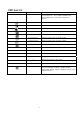
OSD
Menu
and
Icon
List
section)
2. V
olume
Control
(optional)
While
the
OSD
menu
is
not
shown,
press
o
r
button
to
increase
or
decrease
the
audio
volume
level.