
Visual Presenter Instruction Manual
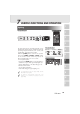
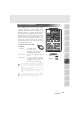
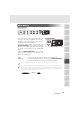

Lighting
The upper lamp unit for presenting material such as
printed matter and 3-D objects, and the base lamp for
presenting transparent material, such as slide, and
negative films, are built in to this product.
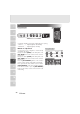
When the [LAMP] button on the front operation
panel or the [LAMP] ( [UPPER] / [BASE] ) button
on the wireless remote control is pressed, the
fluorescent lamp lights up in 1 to 3 seconds.
• Front operation panel
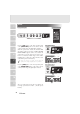
Every time the
[LAMP] button is pressed, lighting is
switched in a cycle of the upper lamp lights up
→
the base lamp lights up → the base lamp goes out.
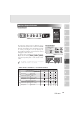
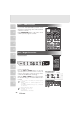
• Wireless remote control
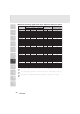
Turn on/off by each button.
In the initial settings, the upper lighting is on.
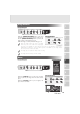
It is impossible to have the upper lamp and the
base lamp lit up together.
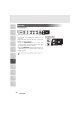
To obtain a sharp image with good color
rendering, it is sometimes necessary to use the
upper lamp.
PAU S E
2x
SET
PRESET
LIVE
MEMORY
CALL
SET
IMAGE
CALL
LAMP
POSI/NEGA COLOR/B&W
UPPER BASE
IRIS
AF
NORMAL OPEN CLOSE
TELE
ZOOM
WIDE
NEAR
FOCUS
FAR
RGB1 RGB2MAIN
MONITOR
OUTPUT
MONITOR OUTPUT
PAUSE
F.A.M.
MAIN
RGB1
RGB2
IRIS
OPEN CLOSE
ZOOM
TELE
WIDE
POSI / NEGA
IMAGE ROTATION
AUTO/MANUAL
CONTRAST
WHITE
BALANCE
LAMP
UPPER / BASE / OFF
AF
IRIS
CLOSE
POSI / NEGA
O
N
AUTO/MANUAL
CONTRAST
WHITE
BALANCE
LAMP
UPPER / BASE / OFF
SET
PRESET
CALL
SET
IMAGE
CALL
LAMP
POSI/NEGA COLOR/B&W
UPPER BASE
20
7
VARIOUS FUNCTIONS AND OPERATION
1
2
3
4
5
6
7
8
9
10
11
Wireless remote control
Front operation panel
Front operation panel
Wireless remote control