
Visual Presenter Instruction Manual

9
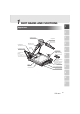
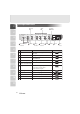
Front Operation Panel
1
2
3
4
5
6
7
8
9
10
11
Name Function
Reference Page
Monitor Output Selection
F.A.M.
(Frame Accumulate Mode)
Zoom
Auto Focus
Contrast
Lamp
Posi/Nega Conversion
Pause
White Balance
Image Rotation
Iris
1
2
3
4
5
10
11
9
7
8
6
To change the output line.
To select F.A.M.
To zoom the object.
To switch Posi/Nega.
To switch the lighting.
To change the setting between still image
and video.
To adjust the brightness of the screen.
To change the mode between AUTO
and ONE-PUSH.
To rotate the image. Every time this button
is pressed, the image rotates
counterclockwise by 90°.
To make documents, etc. visible clearly.
To focus automatically.
P.26
P.26
P.22
P.35
P.21
P.31
P.27
P.25
P.20
P.29
P.28
P.19
MONITOR OUTPUT
PAU S E
F.A.M.
MAIN
RGB1
RGB2
IRIS
OPEN CLOSE
ZOOM
TELE
WIDE
POSI / NEGA
IMAGE ROTATION
AUTO/MANUAL
CONTRAST
WHITE
BALANCE
LAMP
UPPER / BASE / OFF
AF
Pause
1
Iris
2
White
Balance
3
Monitor Output
Selection
4
F.A.M.
5
Image
Rotation
6
Posi/Nega
Conversion
7
Lamp
8
Contrast
9
Zoom
10
Auto
Focus
11