
User's Manual

M1 Installation and Programming Manual
Page 54
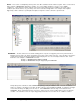
THERMOSTATS - HVAC Thermostats may be read and/or controlled by the M1 and its automation rules engine. This menu
allows each thermostat to be assigned a 12 character description for easy reference in an automation rule. The M1 is
currently compatible with the following communicating thermostats: RCS, Aprilaire, and HAI. Due to the various data
protocols, a Lighting/Thermostat/Serial Interface Expander (ELK-M1XSP) is needed to couple the M1 data bus to HVAC
thermostats. Depending on the brand of thermostat, its wiring interface (RS-232 or RS-485), and the model of M1 that you are
installing, up to 16 HVAC thermostats can be controlled. Many communicating thermostats operate stand-alone when they
are not being remotely commanded by an automation controller.
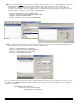
TEXTS - This section allows custom text messages to be constructed and formatted. These messages can be transmitted to
an LCD keypad or out one of the RS232 serial ports to a PC or some other type of equipment. I.E. Touchscreen, Lighting
centers, etc. A message to the keypad could be “Happy Birthday” or “Please Pay Your Bill”, while a message going out a serial
port might be a series of ASCII characters formatted to a certain manufacturers protocol. Special options built into this menu
include: automatic display of temperature readings from Zone Temperature Sensors (ELK-M1ZTS) and from the temperature
sensor built into an LCD Keypad. The sending or receiving of text messages is controlled by the automation rules engine.
NOTE: Text messages share the same memory space as rules. The total number of text messages and rules is limited
by the M1 model that you are installing.