
Manual


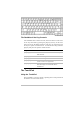


The DeskNote’s Hot Key Controls
Your DeskNote also contains controls, which are feature in blue color
on the keys activated by pressing the [Fn] key (the key in the lower
left corner of the keyboard beside the [Ctrl] key) in conjunction with
the key for specific control function. To activate these keys, hold the
[Fn] key and press the specific control function.
Key Combinations Definitions
[Fn] + [F2] Press this function to mute and unmute the system
audio function.
[Fn] + [F7] Decreases the brightness level.
[Fn] + [F8] Increases the brightness level.
[Fn] + [F10] Use this key combination to expand your video
screen or reset to its original size.
[Fn] + [F12] This key combination toggles the display between
the LCD display and an external CRT or
simultaneous.
The TouchPad
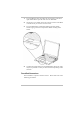
Using the TouchPad
The TouchPad is a pressure sensitive pointing device that provides all
the features of a two-button mouse.
22