
Owner manual





Rev.041114-JA www.elitescreens.com 4
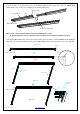
(2) Begin by securing the four corners in the following sequence A→B→C→D (Fig.6).
(3) Insert the fix the plates as shown on Fig. 5. Fix plate ① is about 10cm away from the frame’s corner.
Fix plate ② is about 5cm away. (Fig.7)
&
&
&
&
&
&
&
&
&
&
&
&
&
&
&
&
&
&
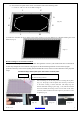
(4) Place a fix plate in the center of each side in the following order E→F→G→H. (Fig.9)
E
G
H
F
(Fig. 6)
(Fig. 7)
(Fig.9)
(Fig. 4)
Insert push plate in
Screen material edge
(Fig. 5)
Schematic cross section of the frame
Plate
Frame groove
A
B
C
D
Tip for attaching the last corner (D):
1. Position yourself left of location ①.
2. Pull the material to the corner of the frame with your hand while your left
hand snaps in the fix plate on location ① (the third red dot).
3. Then insert and snap in the fix plate on location ②.
4. Next, move and position yourself on location ③,then pull the edge to the
frame and fasten plates on locations ③ and ④.
5. Finally, fasten the last fix plate on location ⑤. (Fig.8)
①
②
③
⑤
④
Pull
(Fig. 8)