
Technical data


Owner’s Manual
8
Model: LM, BM
8.1. WEIGHING Mode
Place the load and wait till the scale stands still or until the indication for total price or the load
indication blinks repeatedly.
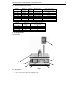
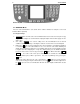
8.1.1 Keyboard keys
1. ON/OFF – Turn on/off the scale. Turn off with this button lessens but doesn’t stop the energy
supply from the adaptor. It’s recommended to unplug the adaptor from the main supply once the
work is done.
2. Zero setting ( >0< )– it is used for setting zero to the load indication if due to external
conditions /temperature change or leveling/ the readout is not zero when no load is weighted.
3. Button Tare ( T )– it is used for entering tare value. The load, which is currently being weighted,
is considered as tare. The load indication is set to zero and the scale starts indicating net
weight, which is marked by a NET icon. If a load lighter than the Tare is being weighted, it leads
to negative tare value displaying the “Т” sign. The “NET” pointer goes out. At that moment the
preset Tare value can be set to zero by pressing the T button. When the buttons 1/10 ,
2/11 , … are used to call out the preset article prices, the relevant tare values, set in
connection with the prices, will be ignored if a tare value is preliminary set by pressing the
T button.
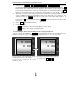
When a tare load is placed on the scale / and either the T button is pressed or the tare
value is called out by pressing the article buttons/, the readout indicates the Net weight. If then
the T is pressed a five-second indication will show the Tare weight and will blink out after
that.