
Technical data

Electronic Scale – models EVLplus хх LМ1, BM1, LT1, BT1
19
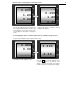
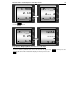
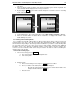
2. As a result on the middle line of the display is shown „0”, on the weight line is shown „0.000”
and „base”
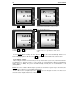
3. Place the “Basic number of details” and enter their number by the numeric keyboard. The
entered number will be displayed on the “Price per unit” line.
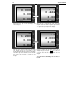
4. By pressing the PRG key, the number and the weight are set and the scale is in “Counting
mode” of the details
5. In the middle line the „base” text and the value of the „Basic number of details” is blinking.
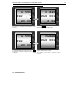
6. Place the desired number of details. On the “Total Price” is displayed the number of the
details blinking text „count”.
8.3. Labeling and Pre-labeling Mode
8.3.1. Labeling! To work with a label printer, the labels and the articles (PLU) need to be previously
unloaded in the scale. This is done by using: Label editor and Parameter editor software offered by
the manufacturer. Depending on the memory and the modification is possible to set the following data
for each article (PLU): price, tare, name (up to 6 lines), article number, expiration date. Additional
information can be set: 3 different consignment numbers, counter number, operator’s number. The
scale has a clock for real time, which can be also presented on the label or used for calculating the
expiration date of the product.
Perform the following steps:
1. Turn on the scale by pressing ON/OFF
a. The scale performs all tests and weights the tare.
b. Turn on the printer
2. Method of work
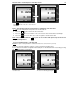
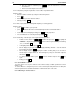
a. Place a load of 200g or more and press PRN to print a test label
b. Choose a number of the article (PLU), which will be weighed
- By using the numerical keyboard, enter the desired article number: For
example: 85 followed by the PLU key.
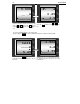
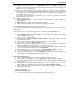
c. Place the load
1.000
bASE
count
bASE
20