
Technical data


Electronic Scales –models ETS хх L1, L2, B1, B2, S1, S2
9
8. Operation Mode
The scale works in 2 major modes: “WEIGHING” and “SERVICE”. Both modes are managed by the
main keyboard.
8.1. WEIGHING MODE
8.1.1 Operation of the keyboard buttons
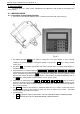
1. Turn On the scale using the ON/OFF switch – located on the bottom part of the scale (13)
Fig. 8.1
2. Key ZERO SETTING >0< – it is used for setting zero to the load indicator. If due to external
conditions temperature change or leveling the readout is not zero the >0< key is used to set the
scale to zero.
3. Key TARE T – it is used for entering the Tare value. The load, which is currently being weighed, is
considered as Tare.
4. Keyboard buttons on white background 0 , 1 , 2 , 3 , 4 , 5 , 6 , 7 , 8 , 9 , C .
These buttons are used in WEIGHING mode are used for entering article’s prices per kilogram. Wrong
figures are deleted by pressing the C key and the price setting starts from the beginning. These
keys are also used to call previously set article price – the number of the article is followed by push of
the PLU key and are stored as article numbers: 01, 02...89, 90…8,500.
5. Article keys on green background: 1 , 2 , 3 , 4 , 5 , 6 , 7 , 8 , 9 They are used for
previously set article prices and tare weight. The total number of the stored articles depends on the
memory of the scale. Scale models L2 and В2 are equipped with additional 56 button keyboard for
direct choice of articles.
6. Key PRN is used for label printing. In SERVICE MODE the key is used to confirm the entered
information. The button is also used as a FEED key when the scale is free of load – The FEED
function ejects empty label from the printer.
7. Functional keys.
PRG - triple press of the key switches the scale from WEIGHING MODE to SERVICE MODE
CP - switches the scale from WEIGHING MODE to SERVICE MODE