
Technical data



Electronic Scales –models ETS хх L1, L2, B1, B2, S1, S2
23
9. Error Mode
9.1. PRIMARY SELF-CHECK:
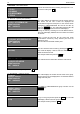
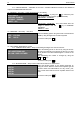
With the initial start the display shows:
START ….. VERSION 0..7
WEIGH MODULE TEST = A1/100
PC CONNECTION IP=192.168.0.202
PRINTER VER=2.22F
- Software version
- Test of the connection and WEIGHTING MODULE
version
- Test of the Ethernet connection and IP address
- Test of printer connection and software version
IMPORTANT: If there are no values on the right side of the equations on 2
nd
, 3rd and 4
th
line – most likely there
is no connection with the corresponding module due to disconnected cable or damage in the module.
The scale will still operate without Ethernet connection or failure of the printer module, in case of load cell failure
the scale freezes.
9.2. ERROR MASSEGES
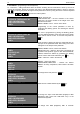
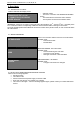
WEIGH MODULE FAIL ….
SYSTEM BLOCKED
Due to lost connection with the load cell. The scale freezes.
Possible cause:
- Disconnected cable
- Module failure
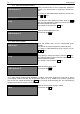
21-01-09 22:10:05
;0;ERR
ZERO SET ERROR. The scale freezes.
Possible cause:
- Placed load during the scale start
- Opened top cover (platter)
- Damager connection or load cell failure
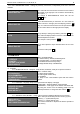
PRINTER ERROR:
NO PAPER
PRINTER ERROR – NO PAPER
Possible cause:
- The paper roll needs to be changed
9.3. WHAT TO DO WHEN AN ERROR MESSAGE APPEARS
When an error message appears:
Unload the scale
Turn Off the scale
Check for disconnected power supply or interface cable
Open and close the top cover (platter) very carefully
Turn On the scale again – if an error message appears again, please contact your nearest authorized
service