
Technical data



Owner’s Manual
20
2.4.1. EDIT DEPARTAMENT NAMES
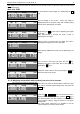
DEPARTAMENT=00
NAME=Department 0
Enter the desired name of the corresponding department
number. You need external PC keyboard to perform this
task.
To change to NEXT/PREVIOUS department number use
the + / - keys.
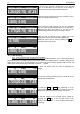
DEPARTAMENT=11
(00..20)
To go directly to other department number, press the PLU
key. The scale will display a field to enter the number. Enter
the desired department number.
For example: 11 and press the PLU key.
DEPARTAMENT=11
NAME=Department 11
Enter the desired department name.
To exit press the CP key.
2.4.2. EDIT GROUP NAMES
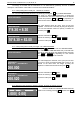
GROUP=00
NAME=Group 0
Enter the desired name for the corresponding group
number.
You need an external PC keyboard to perform this task.
To change to NEXT/PREVIOUS group number use the
+ / - keys.
GROUP=12
(00..20)
To go directly to other group number, press the PLU key.
The scale will display a field to enter the number. Enter the
desired department number.
For example: 12 and press the PLU key.
GROUP=12
NAME=ГрупGroup 12
Enter the desired group name.
To exit press the CP key.
2.4.3. EDIT PREFIX FOR ARTICLE NUMBERS – Example: If set article numbers are in the form of: 80хххх,
means that all numbers start with „80”, this parameter can be set up to: 000080. As a result the operator will
have to enter only 4 digits followed by the No art key. The scale will automatically add „ 80” at the beginning
and after that will perform search in the memory.
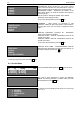
EDIT PREFIX FOR ARTICLE NUMBERS:
000000
Enter the desired prefix. Example: 000080
To exit press the CP key.