
Technical data



Owner’s Manual
18
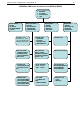
2. PLU SETUP – programming mode PLU(articles)
2.1. PLU EDIT – editing information about the articles. Entering the text information is done by the use of
external PC keyboard. Saving the changes and going to the NEXT/PREVIOUS article is done by using the
+ / - .keys. Moving the pointer through the list of parameters is done by using the arrows of the PC keyboard
or using the 2
4
5
6
keys from the main keyboard.
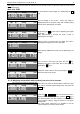
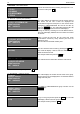
EDIT PLU#1 ENG Rep
PRICE=003.00 TARE=00.000/01.284
NAME1=CHICKEN WINGS
NAME2=PORK,SEASONING
NAME3=
PRICE- price per unit;
TARE=00.000/1.284 – the first numbers is the current
saved tare, the second number is the weight of the load
placed at the moment.
NAME1..NAME3- name1.. name3 of the article
Programming of the current parameter is done by
positioning the blinking pointer and entering the desired
information.
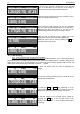
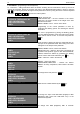
EDIT PLU#1 ENG Rep
PRICE=003.00 TARE=01.284/01.284
NAME1=CHICKEN WINGS
NAME2=PORK,SEASONING
NAME3=
The Tare is programmed by placing the blinking pointer
over the desired parameter. Place the load over the platter
which will be used as a Tare. To save the load press the
Т key.
At the moment of placing the load, the weight will show on
right part of the parameter TARE. After saving it the value
will appear on the left part of the parameter.
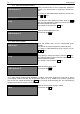
EDIT PLU#1 ENG Rep
NAME4=
EXPIR=DAYS =000
NUM1 =00017
NAME5=
NAME4, NAME5- name4, name5 of the articleа
EXPIR=DAYS=00 – defines in what units is measured the
expiration of the products. Types of units: DAYS; MONTHS;
YEARS; HOURS are defined by positioning the blinking
pointer over the desired text followed by the + key
NUM1 – article № – used in the barcode
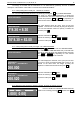
EDIT PLU#1 ENG Rep
NAME6=
GROUP=00
DEPRT =00
LABEL=00
NAME 6 – name of the article
GROUP,DEPRT,LABEL,PART – Defines the article’s
affiliation to Group, Department, Label number and batch
number.
EDIT PLU#1 ENG Rep
PRICE=03.00
NAME1=CHICKEN WINGS
NAME2=PORK, SEASONING
NAME3=
To change the PLU № press the PLU key.
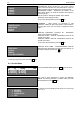
ENTER PLU NUMBER:0002
Enter the new number followed by the PRN key.
EDIT PLU#11 ENG Rep
PRICE=03.00
NAME1=CHICKEN WINGS
NAME2=PORK, SEASONING
NAME3=
To change the input mode ENG REP (English) to BDS
(Bulgarian) REP press both Shift+CTRL keys of the
external PC keyboard.
EDIT PLU#11 Phonetic Rep
To change from BDS (Bulgarian) REP to Phonetic