
Technical data



Electronic Scales –models ETS хх L1, L2, B1, B2, S1, S2
17
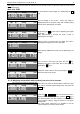
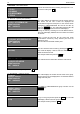
TOT.GROUP
GROUP=5; =Group 5
WEIGHT=00009.900
SUM =000010.10
The scale displays information about the new group
number.
To exit the mode at any time press the CP key.
1.3. BY DEPARTAMENT – Reports by department
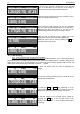
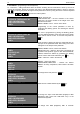
TOT.DEPART.
DEPT=0; =Department 0
WEIGHT=00002.440
SUM =000009.80
The scale displays the number and the name of the
department. On the last 2 line are shown the accumulated
article’s weigh and total price.
TOT.DEPART.
DEPT=1; =Департамент 1
WEIGHT=00005.500
SUM =000013.20
To change to NEXT/PREVIOUS department number use
the + / - keys.
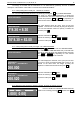
DEPARTAMENT=11
(00..20)
To go directly to other department number, press the PLU
key. The scale will display a field to enter the number. Enter
the desired department number.
For example: 11 and press the PLU key.
TOT.DEPART.
DEPT=5; =Департамент 11
WEIGHT=00009.900
SUM =000010.10
The scale displays information about the new department
number.
To exit the mode at any time press the CP key.
1.4. TOTALS – Total accumulations
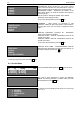
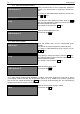
TOTAL
WEIGHT=00002.440
SUM =000009.80
(press “C” key to clear all…)
The scale displays the total accumulation for weigh and
price. To delete all accumulations press the C key.
CLEAR TOTALS? Confirm with “*” key
Confirm that you want to delete by pressing the * key.
SELECT REPORT –
1. BY PLU
2. BY GROUP
3. BY DEPARTAMENT
4. TOTALS
After the DELETE is over the scale is going back into
REPORT MODE.
To exit the mode at any time press the CP key.