
Technical data



Owner’s Manual
14
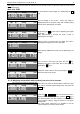
Label related data
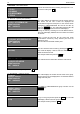
P1=000000
P2=000000
P3=000000
LABEL=00
PARAMETERS: Batch numbers Р1, Р2, Р3 are used to
enter numeric information onto the printed labels. They are
used for applying batch numbers to the produced goods.
PARAMETER: LABEL – determines the number of the
active label, which is in use at the moment and is about to
enter the printer.
Use the arrows to change the position of the desired
parameter and to change its value.
To go to the next parameters press the
key.
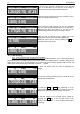
Label related data
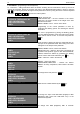
L.NUMBER=000000
OPERATOR=02
SCALE=02
STAND=01
L;NUMBER – Label counter. It’s necessary to add
parameter “LABEL №”, after each print the count increases.
By using this menu you can check or change its current
value.
Parameter OPERATOR– Operator’s № - identification
which can be printed on the label.
Parameter SCALE – Scale № - identification which can be
printed on the label.
Parameter STAND – Stand № - identification which can be
printed on the label.
To go to the next parameters press the
key.
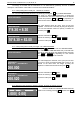
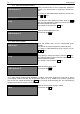
SELECT
OPERATOR=02
SCALE=02
STAND=01
AUTO LABEL=DISABLED
Parameter AUTO LABEL – ENABLE/DISABLE automatic
label print when the weight is greater than the minimum. To
change the parameter press the + key.
To exit the mode at any time press the CP key.
8.3. Service Mode
09.12.08 16:23:20
>0< kg EUR/kg EUR
0.000| 0.00|
To enter SEVICE MODE press the PRG key three times.
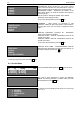
ENTER PASSWORD: 000000
You need to enter password to access the SERVICE
MODE. The factory password is „123456”. After you enter
the password press the PRN key.
FIRMWARE=0.3; SELECT FUNCTION-
1. REPORTS
2. PLU SETUP
3. SYSTEM SETUP
4. TEST
To choose the corresponding mode press one of the keys
from 1 to 4.