
Technical data
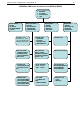



Electronic Scales –models ETS хх L1, L2, B1, B2, S1, S2
11
Note: When the load is less than the minimal load (see the Min symbol on the front panel) the scale doesn’t
calculate total price
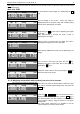
Work with TARE
09.12.08 16:23:20
kg EUR/kg EUR
2.000| 1.20|
2.40
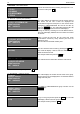
To remember the current weight as a TARE press the Т .
key.
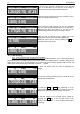
09.12.08 16:23:20
NET kg EUR/kg EUR
0.000| 0.00|
Now the weight is set to Zero. Above the weight is
displayed the „NET” symbol as a sign that a TARE is being
entered and is showing the net weight.
09.12.08 16:23:20
>0< ТАРЕ kg EUR/kg EUR
- 2.000| 0.00|
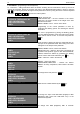
By pressing the Т. key the scale is displaying the weight
of the Tare.
After approximately 5 seconds the scale is back to
displaying the net weight.
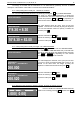
09.12.08 16:23:20
>0< NET kg EUR/kg EUR
- 2.000|
After the load is removed from the platter the scale is
displaying the weight of the active Tare again.
09.12.08 16:23:20
NET kg EUR/kg EUR
1.420| 1.20| 1.70
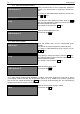
When placing additional load, the scale is displaying its net
weight.
09.12.08 16:23:20
NET kg EUR/kg EUR
0.000| 0.00|
You can save a new Tare over again with the R key.
Displaying the value of the active Tare is done again by
pressing the T. button
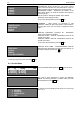
09.12.08 16:23:20
>0< kg EUR/kg EUR
0.000| 0.00|
Setting the scale to Zero is done by pressing the Т . key
when the scale is free of load.
8.1.4. Weighing commodities with previously set price/ price and tare
Let’s set the commodity as article № 398.
09.12.08 16:23:20
>0< kg EUR/kg EUR
0.000| 0.00|
Place the load. Enter the desired article number by using
the numeric keyboard (white background)
and press the
PLU key.
09.12.08 16:23:20
kg EUR/kg EUR
2.284| 3.98|
Enter the 3 , 9 , 8 . keys. The entered number is
displayed in the Price per Unit field, press the PLU key. If
the chosen article is set with numbers 1 to 9. The article
can be directly called by using the buttons 1 to 9 (green
background)
For scale models L2,B2 and S is possible to use the
corresponding keys for direct call of articles.