
Technical data

Owner’s Manual
10
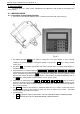
8.1.2. Turn On the Scale
After the scale is turned on, an automatic self-check of all modules is started. Information about the software
version and the IP address is shown on the display. During the self-check process no objects should be placed
on the scale’s platter.
START … VERSION 0.03
WEIGHING MODULE TEST=A1/100
PC connection IP= 192.168.44.202
PRINTER VER=2.22F
After all self-check processes are completed the scale is switching to WEIGHING MODE. On the main display
are shown zeros and “>0<” sign is lit.
09.12.08 16:23:20
>0< kg EUR/kg EUR
0.000| 0.00|
The scale is ready for work.
If the scale is showing DIFFERENT value than „0.000” while
no load is placed on the platter, the >0< button is pressed
to ZERO the scale.
IMPORTANT:
1. In the far left part of the display is shown the weighed values or the values of the Tare.
2. In the middle part of the display is shown the keyboard inputted price or the previously saved price
per unit.
3. In the far right part of the display is calculated the total value according to the weight and the price
per unit
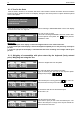
8.1.3. Weighing of commodities with price entered by the keyboard (freely entered
price). Weighing and using the Tare
09.12.08 16:23:20
>0< kg EUR/kg EUR
0.000| 0.00|
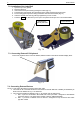
Place the weighed load over the platter.P
09.12.08 16:23:20
kg EUR/kg EUR
1.700| 0.00|
The scale will display the weighed commodity.
Type the desired price per unit via the keyboard (white
background) Example: 2 , 8 , 0 .
09.12.08 16:23:20
kg EUR/kg EUR
1.700| 2.80| 4.76
If the entered price is wrong press the C key and it will
clear, then enter the new price. Example:
2 , 5 , 0
09.12.08 16:23:25
kg EUR/kg EUR
1.700| 2.50| 4.25
In the field for total value is calculated the price.
In this case: 4,25
Take
09.12.08 16:23:20
>0< kg EUR/kg EUR
0.000| 2.50|
Take the load from the platter.
In the field for price per unit is the last entered price. The
field for the total price is empty and it stay like that till the
load is minimal for the scale.