
User Manual

GBGB
- 22 -
•
Take care to maintain a steady foothold and
hold the equipment firmly in both hands away
from your body. Before you switch on, make
sure that the equipment is not touching any
objects.
Work practice
•
A hedge trimmer can be used to cut shrubs
and bushes as well as hedges.
•
To obtain the best cutting results, hold the
hedge trimmer so that the cutter teeth are
at an angle of approx. 15° in relation to the
hedge (see Fig. 17).
•
The twin-bladed cutters rotate in opposite
directions, thus enabling cutting in both direc-
tions (see Fig. 18).
•
It is recommended to tie a guide line of string
or the like along the hedge so that you cut the
hedge to a level height. Cut off all branches
which protrude beyond the guide line (see
Fig. 19/20).
•
Cut the sides of the hedge with curve-shaped
movements from the bottom up (see Fig. 21).
8. Cleaning, maintenance and
ordering of spare parts
Danger!
Remove the battery pack before doing any
cleaning and maintenance work.
8.1 Cleaning
•
Regularly clean the clamping mechanism by
blowing it out with compressed air or cleaning
it with a brush. Do not use tools for cleaning.
•
Keep the handles free of grease so that you
can maintain a firm grip.
•
Clean the equipment as required with a damp
cloth and, if necessary, mild washing up li-
quid.
•
Never immerse the equipment in water or
other liquids in order to clean it.
•
Use a brush to remove deposits from the sa-
fety guards.
•
Keep all safety devices, air vents and the
motor housing free of dirt and dust as far as
possible. Wipe the equipment with a clean
cloth or blow it with compressed air at low
pressure.
•
We recommend that you clean the device
immediately each time you have finished
using it.
•
Clean the equipment regularly with a moist
cloth and some soft soap. Do not use
the battery pack, proceed in reverse order.
5.10 Charging the battery (Fig. 15-16)
1. Take the battery pack out of the equipment.
Do this by pressing the pushlock button (T).
2. Check that your mains voltage is the same as
that marked on the rating plate of the battery
charger. Insert the power plug of the charger
(21) into the mains socket outlet. The green
LED will then begin to ash.
3. Insert the battery pack (1) into the battery
charger (21).
4. In the section entitled „Charger indicator“ you
will nd a table with an explanation of the LED
indicator on the charger.
The battery pack can become a little warm during
the charging. This is normal.
If the battery pack fails to charge, check:
•
whether there is voltage at the socket outlet
•
whether there is good contact at the charging
contacts.
If the battery pack still fails to charge, send
•
the charging unit
•
and the battery pack
to our customer service center.
To ensure that items are properly packaged
and delivered when you send them to us,
please contact our customer service or the
point of sale at which the equipment was
purchased.
When shipping or disposing of batteries and
cordless tools, always ensure that they are
packed individually in plastic bags to prevent
short circuits and res.
To ensure that the battery pack provides long ser-
vice, you should take care to recharge it promptly.
You must recharge the battery pack when you
notice that the performance of the device drops.
Never allow the battery pack to become fully di-
scharged. This will cause it to develop a defect.
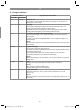
5.11 Battery capacity indicator (Fig. 16a)
Press the button for the battery capacity indicator
(A). The battery capacity indicator (B) shows the
charge status of the battery using 3 LEDs.
All 3 LEDs are lit:
The battery is fully charged.
2 or 1 LED(s) are lit:
The battery has an adequate remaining charge.
1 LED ashes:
The battery is empty, recharge the battery.
All LEDs blink:
The battery temperature is too low. Remove the
battery from the equipment, keep it at room tem-
perature for one day. If the fault reoccurs, this me-
ans that the rechargeable battery has undergone
exhaustive discharge and is defective. Remove
the battery from the equipment. Never use or
charge a defective battery.
6. Operation
Please note that the statutory regulations gover-
ning noise abatement may dier from one loca-
tion to another.
Caution! Always use the shoulder strap when
working with the equipment. Always switch o the
equipment before you take o the shoulder strap.
Otherwise there is a risk of injury.
Put on the shoulder strap as described above, t
the required mounting kit and adjust the equip-
ment to suit your needs.
Switching on/o
Switching on
•
Hold the equipment by the handles with both
hands (thumbs under the additional handle).
•
Slide the safety lock-off (Fig. 3/Item 4) to the
front and hold.
•
Switch on the equipment with the On/Off
switch (Fig. 3/Item 3). You can then release
the safety lock-off.
Switching o
Release the On/O switch (Fig. 3/Item 3).
7. Working with the hedge trimmer
mounting kit
•
Check that the cutters work properly. The
twin-bladed cutters rotate in opposite direc-
tions, thus guaranteeing high cutting perfor-
mance and smooth operation.
Anl_GE_HH_18_Li_T_SPK9.indb 22Anl_GE_HH_18_Li_T_SPK9.indb 22 19.02.2021 06:38:3419.02.2021 06:38:34