
Specifications





24
IV‐2.DriverUninstallation
IV‐2‐1.WindowsXP/Vista/7
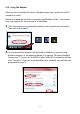
1. GotoStart>Programs>EdimaxWirelessLAN>Uninstall.
2. Followtheonscreeninstructions.Anuninstallwizardwillguideyou
throughtheprocess.
IV‐2‐2.Windows8
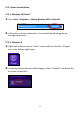
1. Rightclickanywhereonthe“Start”screenandthenclickthe“Allapps”
iconinthebottomrightcorner.
2. LocatetheEdimaxWirelessLANcategory,select“Uninstall”andfollowthe
on‐screeninstructions.