
Specifications





18
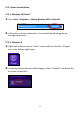
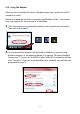
2. Withintwominutes,selectyourwireless/router/accesspointfromthe
“WPSAP”listasshownbelow,andthenclickthe“PIN”buttoninthe
bottomleftofthe“WPS”page.Thewirelessadapterwillestablisha
connectionwithyourwirelessrouter/accesspoint.
Belowisadescriptionofalltheitemsonthe“WPS”page:
Rescan Refreshthelistofavailablewirelessnetworks.
Information Displaymoreinformationabouttheselectedwireless
network.
PinCode
Renew GenerateanewPINcodeforWPSPINcodesetup.
ConfigMode
Enrollee “Enrollee”meansthedeviceactsawirelessclientand
willfollowthesettingsofthewirelessrouter/access
point.Thisisthedefaultsetting.
Registrar “Registrar”meanstheotherWPSdevicewillfollowthe
settingsofthewirelessadapter.Enrolleemode
(above)isrecommended.
ProfileDetail ShowdetailsofselectedWPSprofile.
Connect ConnecttoselectedWPSprofile.
Rotate RotateWPSprofile.
Disconnect DisconnectfromselectedWPSprofile.