
Specifications




17
PBC:PushButtonConfiguration
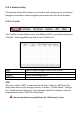
TheEW‐7711MACdoesnotfeatureaphysicalWPSbutton,butPBCWPScan
beexecutedfromthispagebyfollowingthestepsbelow:
1. PresstheWPSbuttononyourwirelessrouter/accesspointforthecorrect
lengthoftimetoactivateitsWPS.
Pleasechecktheinstructionsforyourwirelessdeviceforhowlong
youneedtoholddownitsWPSbuttontoactivateWPS.
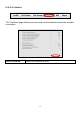
2. Withintwominutes,clickthe“PBC”buttoninthebottomleftofthe
“WPS”page.Thewirelessadapterwillestablishaconnectionwithyour
wirelessrouter/accesspoint.
PINCodeWPS
PINcodeWPSincludestheadditionaluseofaPINcodebetweendevices.This
isusefulforidentificationandverificationpurposesincrowdedwireless
environmentswithmultiplerouters/accesspoints/wirelessdevices.
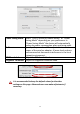
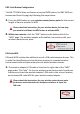
1. Thewirelessadapter’sPINcodeislistedontherightsideofthe“WPS”
pageunder“PinCode”.Gotoyourwirelessrouter/accesspoint’swebuser
interfaceandinputthewirelessadapter’sPINcodeinthecorrectlocation,
andactivatePINcodeWPSforyourwirelessrouter/adapter.
Pleasechecktheinstructionsforyourwirelessrouter/accesspoint
forhowtoaccessthewebuserinterfaceandwheretoinputthe
PINcode.