
Specifications




11
III‐3‐2.WirelessUtility
Thewirelessutilityoffersfeaturestomonitorandconfigureyourconnection.
Navigatethewirelessutilityusingthemenuacrossthetopofthewindow.
III‐3‐2‐1.Profile
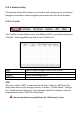
The“Profile”screenallowsyoutosavedifferentWi‐Ficonnectionsettingsas
“Profiles”.Existingprofilesarelistedinthe“ProfileList”.
ADD Opensanewwindowtoaddanewprofile.
EDIT Editanexistingprofile.
DELETE Deleteanexistingprofile.
ACTIVATE Activate(connectto)anexistingprofile.
ADD
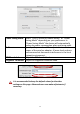
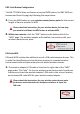
Whenyouselect“ADD”,anewwindowwillopen.SelectanSSIDfromthe
drop‐downmenuinthetoprightcorner,orentera“ProfileName”,thengo
the“Authentication&Security”tabandentertheWi‐Finetwork’ssecurity
key/passwordunder“WPAPre‐SharedKey”.
Youcanalsoaddanewprofilefromthe“Site Survey”screen.