
User manual

5
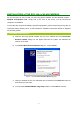
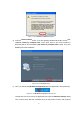
Figure 2-4: The Hardware Installation Dialog Box
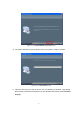
g) From the
Install Finished
screen, if you are operating Windows 98 or ME, choose
Yes,
I want to restart my computer now; on the other hand, if your current system is
Windows 2000 or XP, choose
No, I will restart my computer later
instead. Then click
Finish
to finish the installation.
Figure 2-5: The Complete Screen
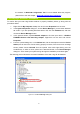
h) Then, you will find the WLAN-G Configuration Tool icon appeared in the system tray.
Figure 2-6: The WLAN-G Configuration Tool Tray Icon
Double-click the icon to launch the application and open the
Wireless Settings
dialog
box, in which seven tabs are contained. Now you may start to monitor and configure