
User manual

18
A
A
P
P
P
P
E
E
N
N
D
D
I
I
X
X
A
A
:
:
T
T
R
R
O
O
U
U
B
B
L
L
E
E
S
S
H
H
O
O
O
O
T
T
I
I
N
N
G
G
This section provides solutions to problems that you might encounter during the installation and
operation of your 802.11b/g WLAN Cardbus. Please refer to the desired topics below and read the
description to solve your problems.
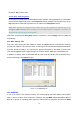
Disable 802.11b/g WLAN Cardbus
Supposed you do not need the 802.11b/g WLAN Cardbus to establish the wireless connectivity for
any reason, you can directly unplug and remove your 802.11b/g WLAN Cardbus from the Cardbus
slot on your computer, or click
Disable Radio
on the
Status
tab of the
Wireless Settings
dialog
box. Once the device is removed, the connection to the network stops. Thus, be sure that you have
closed all the network applications before processing the removal.
Uninstall WLAN-G Configuration Tool and the Card’s Driver
Prior to starting uninstalling, please make sure that the utility is closed, and then go along with the
procedures below to entirely uninstall
WLAN-G Configuration Tool
and the card driver.
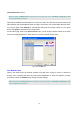
1. Right-click the
My Computer
desktop icon and choose
Properties
from its menu.
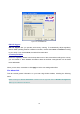
2. In the
System Properties
dialog box, choose
Device Manager
if you are under Windows
98 or ME. If you are operating Windows 2000 or XP, click the Hardware tab, and then
choose the
Device Manager
button.
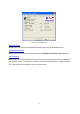
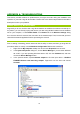
3. In the opened window, expand
Network adapters
to find the input device –
WLAN-G
FRISBEE Wireless LAN 802.11b/g Adapter
. Right-click over the item and choose
Uninstall.
Figure 4-1: The Device Manager Dialog Box