
User manual

14
By default,
Key 1
will be used.
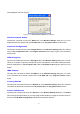
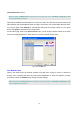
Create Keys with Passphrase
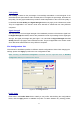
Choose this command when the associated wireless network uses a passphrase to create WEP
keys. Enter the passphrase string in the
Passphrase
filed to generate four encryption keys in the
Key
fields above. Note that only letters A-F are valid for the
Passphrase
feature.
Note:
When entering the passphrase here, ensure that you have specified an accurate type of the
Encryption (WEP security) above according to the associated agent’s configuration. Otherwise, the
inaccuracy will cause any failure of performance.
After finish configuring the
Encryption
features, remember to click the
Apply
button to initiate the
new settings.
The Site Survey Tab
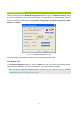
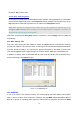
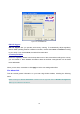
First of all, while entering this tab, please do choose the
Rescan
button to reinitiate the scanning
process and update the list. Later the result of scanning will be renewed and displayed afterwards.
From the offered information, you may learn the general information on the status of current scan
lines, including BSSID, SSID, signal strength, the channel number, WEP type, and network type.
In addition, to directly make an association with any site on the list, double-click the intended entry,
and you will be led to the
Status
tab then.
Figure 3-7: The Site Survey Tab
The IBSS Tab
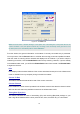
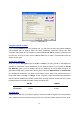
If you, as a creator of the wireless network, are communicating with other stations via the IBSS
(802.11 Ad-hoc) mode to form peer-to-peer networks, click the
IBSS
(
I
ndependent
B
asic
S
ervice
S
et) tab to specify an operating radio frequency channel from the pull-down list under the
IBSS