
Installation Manual





Fault and Warning Codes
82 9000X AF Drives MN04001004E—May 2011 www.eaton.com
Fault Codes, continued
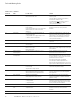
Fault Code Fault Possible Cause Solution
7 Saturation trip Defective component
Motor or motor cable short
Cannot be reset from the keypad
Switch off power
If this fault appears simultaneously with Fault 1,
check the motor and motor cables
IF THE PROBLEM IS NOT
IN THE MOTOR OR ITS
CABLES, DO NOT RECONNECT POWER!
Contact your Eaton distributor
8 System fault Component failure
Faulty operation
Exceptional fault data record, see the Active Fault
Menu and Fault Time Data Record for more
information
Reset the fault and restart
Should the fault reoccur, contact your Eaton
distributor
9** Undervoltage DC link voltage is less than the minimum safe
operating voltage limit
• most probable cause: supply voltage too low
• SVX9000/SPX9000 internal fault
If there was a supply voltage loss or dip, reset the
fault and restart the SVX9000/SPX9000. Check the
supply voltage. If it was within specification at the
time of the fault, an internal failure has occurred
Contact your Eaton distributor
10** Input line supervision Input line phase is low or missing Check the utility supply voltage, cables, and
connections
11** Output phase supervision Current sensing indicates that there is no current in
one motor phase
Check the motor cables, connections, and motor
12 Brake chopper supervision No brake resistor installed
Brake resistor is open
Brake chopper failure
Check the brake resistor
If the resistor is ok, the chopper is faulty. Contact your
Eaton distributor
13 SVX9000/SPX9000
undertemperature
Heatsink temperature is under 14°F (–10°C) Provide supplemental heating or relocate the
SVX9000/SPX9000 to a warmer location
14 SVX9000/SPX9000
overtemperature
Heatsink temperature is over 194°F (90°C) An overtemperature warning is issued when the
heatsink temperature exceeds 185°F (85°C), a fault
occurs at 194°F (90°C). Check for the correct amount
and unrestricted flow of cooling air
Check the heatsink for dust or dirt buildup
Check the highest ambient temperature level
Make sure that the switching frequency is not set too
high in relation to ambient temperature and motor load
15** Motor stalled Motor or load mechanical failure
Load is too high
Stall parameter settings incorrect
Check motor, mechanical system, and load level
Confirm the stall parameter settings
16** Motor overtemperature Motor is overloaded
Motor overheating has been detected by the
SVX9000/SPX9000 motor temperature model
Decrease the motor load
If no motor overload exists, check the temperature
model parameters
17** Motor underload Mechanical or load problems
Underload parameter settings incorrect
Check the motor. Check for a loose belt, broken
coupling or load problems. Confirm the underload
parameter settings
22 EEPROM checksum fault Parameter save fault due to:
• faulty operation
• component failure
Upon reset of this fault, the SVX9000/SPX9000 will
automatically reload the parameter default settings.
Check all parameter settings after reset. If the fault
reoccurs, contact your Eaton distributor
24* Counter fault Values displayed on the counters are incorrect —
25 Microprocessor watchdog
fault
Faulty operation
Component failure
Reset the fault and restart
Should the fault reoccur, contact your Eaton
distributor
26 Startup prevented Startup of the drive has been prevented Check Start Enable/Interlock settings