
Installation Manual





Menu Information
46 9000X AF Drives MN04001004E—May 2011 www.eaton.com
Startup Wizard
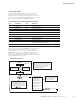
Upon initial power up, the Startup Wizard guides the
commissioner through the basic SVX9000/SPX9000 setup.
The Startup Wizard may be set to function upon an
application change by setting parameter P5.5.3.
Upon power up, the display will read:
“Startup Wizard”
“Press enter”
Upon pressing ENTER, the choice for the language to be
used followed by the application desired are presented. The
lists are navigated by using the right arrow and up and down
arrow buttons. A selection is confirmed by pressing ENTER.
After these two selections, the following text appears:
“Setup starts”
“Press enter”
When ENTER is pressed, the setup parameter list is
presented. The parameter value will be blinking, allowing
you to set the parameters with the arrow buttons. The value
is confirmed using the ENTER button, after which the next
parameter in the list will be displayed.
After the last setup parameter is presented, the following
text is displayed:
“Repeat setup?”
“Press ➔“
If the left arrow is pressed, the Startup Wizard restarts.
If the ENTER button is pressed, the following is displayed:
“Setup done”
After this, the display returns to the default page, normally
the Operate Menu.