
Installation Manual






Menu Information
9000X AF Drives MN04001004E—May 2011 www.eaton.com 43
Expander Board Menu (M6)
The Expander Board Menu makes it possible for the user to:
●
See what expander boards are connected to the control
board and
●
Access and edit the parameters associated with the
expander board
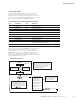
Expander Board Menu Structure
Example of Expander Board Parameters for Option Board A9
P6.1.1.1
AI1 Mode
Range: 1–5 Default: 3
AI1 Mode
Analog Input 1 input options:
1 0 to 20 mA
2 4 to 20 mA
3 0 to 10V
4 2 to 10V
5 –10 to 10VP
P6.1.1.2
AI2 Mode
Range: 1–5 Default: 1
AI2 Mode
Analog Input 2 input options:
1 0 to 20 mA
2 4 to 20 mA
3 0 to 10V
4 2 to 10V
5 –10 to 10VP
P6.1.1.3
AO1 Mode
Range: 1–4 Default: 1
A01 Mode
Analog Output 1 output options:
1 0 to 20 mA
2 4 to 20 mA
3 0 to 10V
4 2 to 10V
G6.1 “A: OPTA9”
G6.2 “B: ”
G6.3 “C: ”
G6.4 “D: ”
G6.5 “E: ”
(Slot A Option Board)
(Slot B Option Board)
(Slot C Option Board)
(Slot D Option Board)
(Slot E Option Board)
G6.1.1 Parameters
P6.1.1.1 AI1 Mode
P6.1.1.3 AO1 Mode
G6.1.2 I/O-monitor
P6.1.1.2 AI2 Mode
+
+
+
+
+