
Installation Manual


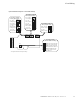


Menu Information
30 9000X AF Drives MN04001004E—May 2011 www.eaton.com
Menu Navigation
Navigation Tips
●
To navigate within one level of a menu, use the up and
down arrows
●
To move deeper into the menu structure and back out, use
the right and left arrows
●
To edit a parameter, navigate to show that parameter’s
value, and press the right arrow button to enter the edit
mode. In edit mode, the parameter value will flash
●
When in edit mode, the parameter value can be changed
by pressing the up or down arrow keys
●
When in edit mode, pressing the right arrow a second time
will allow you to edit the parameter value digit by digit
●
To confirm the parameter change you must press the
ENTER button. The value will not change unless the
ENTER button is pushed
●
Some parameters cannot be changed while the SVX9000/
SPX9000 is running. The screen will display LOCKED if you
attempt to edit these parameters while the drive is
running. Stop the drive to edit these parameters. See the
appropriate application manual for identification of these
parameters specific to your chosen application