
Installation Manual






Spare Parts
114 9000X AF Drives MN04001004E—May 2011 www.eaton.com
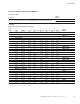
Drive Options
Control Panel Options
Control Panel Factory Options
Factory
Installed
Field Installed
NEMA Type 1
Description Option Code Catalog Number
Local/Remote Keypad SVX9000 Control Panel—This option is standard on all drives and consists of an
RS-232 connection, backlit alphanumeric LCD display with nine indicators for the RUN status and two indicators
for the control source. The nine pushbuttons on the panel are used for panel programming and monitoring of all
9000X parameters. The panel is detachable and isolated from the input line potential. Include LOC/REM key to
choose control location.
A KEYPAD-LOC/REM
Keypad Remote Mounting Kit—This option is used to remote mount the 9000X keypad. The footprint is
compatible to the SV9000 remote mount kit. Includes 10 ft cable, keypad holder, and mounting hardware.
— OPTRMT-KIT-9000X
Keypad Blank—9000X Series select keypad for use with special and custom applications. — KEYPAD-BLANK
9000X Drive—A PC-based tool for controlling and monitoring of the 9000X. Features include: loading
parameters that can be saved to a file or printed, setting references, starting and stopping the motor, monitoring
signals in graphical or text form, and real-time display. To avoid damage to the drive or computer, SVDrivecable
must be used.
— 9000XDRIVE
SVDrivecable—6 ft (1.8m) RS-232 cable (22 gauge) with a 7-pin connector on each end. Should be used in
conjunction with the 9000X drive option to avoid damage to the drive or the computer. The same cable can be
used for downloading specialized applications to the drive.
— SVDRIVECABLE