
Firmware Manual



9000X AF Drives
MN04004001E
For more information visit: www.eaton.com
6-11
August 2010
Multi-Purpose Control Application
Analog Input 2 (Control Keypad: Menu M1
➔
G1.2.3)
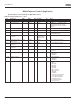
Table 6-9: Analog Input 2 Parameters — G1.2.3
Remember to place jumpers of block X2 accordingly. See 9000X AF Drives User Manual, Chapter 4.
Analog Input 3 (Control Keypad: Menu M1
➔
G1.2.4)
Table 6-10: Analog Input 3 Parameters — G1.2.4
Code Parameter Min. Max. Unit Default Cust ID Note
P1.2.3.1
AI2 signal
selection
0 A.2 388 TTF programming.
See chapter 6.3
P1.2.3.2 AI2 filter time 0.00 10.00 s 0.10 329 0 = No filtering
P1.2.3.3 AI2 signal range 0 3 1 325 0 = 0–100%
1 = 4mA/20%–100%
2 = -10V...+10V
3 = Custom range
P1.2.3.4 AI2 custom
minimum setting
-160.00 160.00 % 0.00 326
P1.2.3.5 AI2 custom
maximum setting
-160.00 160.00 % 100.00 327
P1.2.3.6 AI2 reference
scaling, minimum
value
0.00 320.00 Hz 0.00 393 Selects the frequency that
corresponds to the min.
reference signal
P1.2.3.7 AI2 reference
scaling, maximum
value
0.00 320.00 Hz 0.00 394 Selects the frequency that
corresponds to the max.
reference signal
P1.2.3.8 AI2 joystick
hysteresis
0.00 20.00 % 0.00 395 Dead zone for joystick input
P1.2.3.9 AI2 sleep limit 0.00 100.00 % 0.00 396 Drive goes to sleep mode if
input is below this limit for
set time.
P1.2.3.10 AI2 sleep delay 0.00 320.00 s 0.00 397
P1.2.3.11 AI2 joystick offset -50.00 50.00 % 0.00 166
Code Parameter Min. Max. Unit Default Cust ID Note
P1.2.4.1
AI3 signal
selection
0 0.1 141 TTF programming.
See chapter 6.3
P1.2.4.2 AI3 filter time 0.00 10.00 s 0.10 142 0 = No filtering
P1.2.4.3 AI3 signal range 0 3 1 143 0 = 0–100%
1 = 4mA/20%–100%
2 = -10V...+10V
3 = Custom range
P1.2.4.4 AI3 custom
minimum setting
-160.00 160.00 % 0.00 144
P1.2.4.5 AI3 custom
maximum setting
-160.00 160.00 % 100.00 145
P1.2.4.6 AI3 signal
inversion
0 1 0 151 0 = Not inverted
1 = Inverted