
Firmware Manual





9000X AF Drives
8-84 For more information visit: www.eaton.com
MN04004001E
August 2010
Description of Parameters
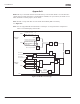
Figure 8-64: Actual Value Special Display
1032 Interlock selection 7 (P1.9.23)
With this parameter you can activate or deactivate the feedback signal from the
drives. The interlock feedback signals come from the switches that connect the
motors to the automatic control (frequency converter), directly to the mains line or
place them in the off-state. The interlock feedback functions are connected to the
digital inputs of the frequency converter. Program ID426
to ID430 to connect the
feedback functions to the digital inputs. Each auxiliary drive must be connected to its
own interlock input. The Pump and fan control only controls those motors whose
interlock input is active.
0 Interlock feedback not used
The frequency converter receives no interlock feedback from the auxiliary drives
1 Update of autochange order in Stop
The frequency converter receives interlock feedback from the auxiliary drives. In case
one of the auxiliary drives is, for some reason, disconnected from the system and
eventually re-connected, it will be placed last in the autochange line without stopping
the system. However, if the autochange order now becomes, for example, [P1 ➔ P3 ➔
P4 ➔ P2], it will be updated in the next Stop (autochange, sleep, stop, etc.).
Example:
[P1
➔
P3
➔
P4]
➔
[P2 LOCKED]
➔
[P1
➔
P3
➔
P4
➔
P2]
➔
[SLEEP]
➔
[P1
➔
P2
➔
P3
➔
P4]
2 Update of order immediately
The frequency converter receives interlock feedback from the auxiliary drives. At re-
connection of an auxiliary drive to the autochange line, the automatics will stop all
motors immediately and re-start with a new setup.
Example:
[P1
➔
P2
➔
P4]
➔
[P3 LOCKED]
➔
[STOP]
➔
[P1
➔
P2
➔
P3
➔
P4]
1033 Actual value special display
minimum
7 (P1.9.29)
1034 Actual value special display
maximum
7 (P1.9.30)
1035 Actual value special display
decimals
7 (P1.9.31)
These parameters set the minimum and maximum values and the number of
decimals of the actual value special display. Observe the actual value display in menu
M1, Monitoring values.
Specl Displ Min
0.00
P1.2.29
Actual Value
Min (Max)
Number of
Decimals