User Manual
Manuals
Brands
EasyN Manuals
Computer Accessories
NR-1-B Series
21
22
23
24
25
26
27
28
29
30
29
12
、
Network T
est
Network T
est
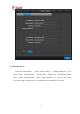
Enter the “Main Menu” and sel
ect “Network T
e
st”. Input th
e device name in “Device
detect” or input an IP
address you will test in
“IP
addres
s detect”, and then click “OK” to
test.
As shown in the following figure:
1
...
...
27
28
29
30
31
...
...
39