
User's Manual



38
38
Application
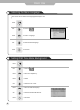
Viewing the Closed Captions
Use to move to .
Press to move to "Closed Caption".
Press .
Use to set the closed captions.
Press to exit menu.
You can select these options in the following order.
You can get the same result by pressing the button on the remote control.
Listening to stereo sound MTS(Multi Television sound)
Press Button on the remote control.(Multi Television sound)
Depending on the particular program being broadcasted, you can listen to stereo, mono or a secondary audio
program.
The closed caption function will be off automatically when PIP function is on.
(To use a closed caption function, turn PIP function off.)