
User's Manual



32
Selecting the Menu Language
32
Basic Use
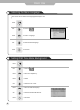
Menu screen can be viewed in the language preferred by the user.
Use to move to .
Press to move to "Language".
Press .
Use to select the desired language.
Press to exit menu.
Use to move to .
Press to move to "Transparency" .
Press to select.
Press .
Use to select the "On" or "Off".
Press to move to "OSD Timeout(sec)".
use to select the desired OSD Timeout.
Press to exit menu.
Setting OSD Tone Menu Background