
Service manual




PROGRAMMING
3-20
September 2001
Part No. 001-7240-001
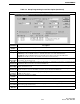
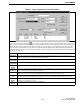
Parameter Description
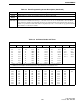
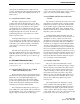
Done Button Click this button when finished editing the bank to save the changes.
Cancel
Button
Click this button to exit the screen without saving any changes to the bank.
Default
Bank Button
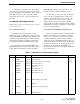
A default bank can be programmed in the Menu Items screen (Section 3.6.5). Clicking this button assigns the
current bank as the default without having to select that screen. One use of default banks is when the Bank
menu parameter is disabled. Several banks can then be programmed and the desired bank can be selectively
enabled on a per transceiver basis. This button is displayed only if two or more banks are programmed and the
selected bank is not already the default.
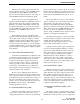
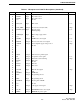
Table 3-6 Call Guard Codes and Tones
Recommended Tone Call Guard Codes
Code Freq Code Freq Code Freq Code Freq Code Freq
01 67.0 10 94.8 19 127.3 28 173.8 37* 241.8
02 71.9 11** 97.4 20 131.8 29 179.9 38* 250.3
03 74.4 12 100.0 21 136.5 30 186.2 39** 69.3
04 77.0 13 103.5 22 141.3 31 192.8 40** 206.5
05 79.7 14 107.2 23 146.2 32 203.5 41* ** 229.1
06 82.5 15 110.9 24 151.4 33 210.7 42* ** 254.1
07 85.4 16 114.8 25 156.7 34* 218.1
08 88.5 17 118.8 26 162.2 35* 225.7
09 91.5 18 123.0 27 167.9 36* 233.6
* These tones normally are not used because of their close proximity to the voice frequencies.
** This tone is normally not used because it may cause interference with adjacent tones.
Recommended Digital Call Guard Codes
023 065 131 172 261 346 431 532 654 743
025 071 132 174 263 351 432 546 662 754
026 072 134 205 265 364 445 565 664
031 073 143 223 271 365 464 606 703
032 074 152 226 306 371 465 612 712
043 114 155 243 311 411 466 624 723
047 115 156 244 315 412 503 627 731
051 116 162 245 331 413 506 631 732
054 125 165 251 343 423 516 632 734
Table 3-5 Bank Programming Screen Description (Continued)