
Service manual




PROGRAMMING
3-9
November 2001
Part No. 001-7240-001
Call Delay - Selects the time from 0-7 seconds before
scanning resumes after transmitting a message
(Section 2.6.9).
Scan Continue - Selects the maximum time from 0-60
seconds that a call is monitored before scanning
resumes (Section 2.6.9).
Proceed Tone Delay - Programs how long the proceed
tone is delayed after the PTT switch is pressed on
groups that have the delayed proceed tone feature
enabled. Times of 0-2.5 seconds can be programmed
(Section 2.4.9).
Transmit Time-Out - Programs the time-out timer
(Section 2.4.11).
3.6.5 MENU ITEMS SCREEN
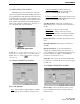
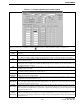
The Menu Items screen shown above programs
the parameters that are selectable in the menu mode. It
also programs the default status of parameters not
controlled by the menu mode or an option switch.
Some functions can be controlled by both an option
switch and the menu mode.
If a function is programmed as not selectable (no
check in the check box), it is fixed in the condition
selected in the drop-down list. For example, if “Tones”
is not checked and “All” is selected, the Tones menu
parameter is not selectable and all tones always sound.
If a menu item is selectable by the menu mode or
an option switch, the default condition exists only until
the first time that function is changed manually or
automatically. The last selected and not the default
condition is selected when power is turned on. Refer to
Section 2.5.2 for more menu mode information, and to
Table 3-1 for brief descriptions of items programmed
in the Menu Items screen.
3.6.6 KEY ASSIGNMENT SCREEN
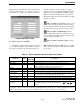
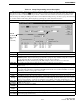
The Key Assignment screen shown above
programs the three option switches. To program a
switch, select the desired function from the drop-down
list for that switch. When finished, click the OK button
to exit and save the changes or Cancel to exit without
saving.
All functions that are selectable by the keypad
(except 0-9) can also be assigned to an option switch
to allow them to be quickly selected. For example,
scanning could be turned on and off by pressing FCN
SCAN or the option switch on the top panel (FCN is
not pressed when the option switch is used). The
option switch functions that can be programmed are
listed in Table 3-1.
3.6.7 EDIT TELEPHONE NUMBERS SCREEN
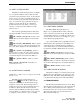
The Telephone Numbers screen which follows
pre-programs up to 10 telephone numbers that can be
recalled from memory using the dial mode. If the box
to the right of the number is checked, it can be repro-