
Service manual


OPERATION
2-10
November 2001
Part No. 001-7240-001
Milwaukee. Up to sixteen banks can be programmed,
and each bank is identified by a unique alpha tag.
Banks are selected by the BANK menu
parameter. In the menu mode, select the “BANK SEL”
parameter and then the desired bank as described in
Section 2.5.2. If this menu parameter is not available,
banks are not selectable.
When a different bank is selected, the last
selected system in that bank is displayed, and the
displayed group is the last selected group of that
system. These are the only user selected functions that
are stored on a per bank basis.
Any programmed system can be assigned to a
bank, and the system numbering can be different for
each bank. Only the systems in the currently selected
bank are selected or scanned, and at least one bank is
always programmed. Unique bank parameters include
Home system/group (see Section 2.4.6), default scan
enable status, and default scan list status of each
system.
The default scan status of the bank is valid only
until the first time it is changed by the scan enable
(FCN SCAN) key. Cycling power or re-selecting the
bank does not restore the programmed status.
Likewise, the default scan list parameter permits
the default scan list status of each system to be set on a
per bank basis. If the SCN SAVE menu parameter is
then disabled and the default set to “Off”, the scan list
status of that system in that bank returns to the default
status whenever power is cycled. Otherwise, the
default status is valid only until the first time the scan
list status is changed by the S.A/D function.
2.4.2 CALL INDICATOR
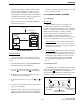
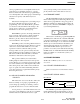
The call indicator is “C” in the upper part of the
display (see following illustration). This indicator
shows when a call was received while you were away
from the radio. Individual groups can be programmed
for this feature and it then turns on when a call is
received on one of those groups.
This indicator is turned off by pressing any button
or cycling power. If scanning and the “Last Received”
configuration is programmed (see Section 2.6.10), the
system and group of the last call are displayed. Other-
wise, the currently selected system/group is displayed.
Each selectable group can be programmed so that
the Call indicator is activated when a call is received.
With conventional operation, the Call indicator is acti-
vated if the transceiver unsquelches for 2 seconds or
longer. Therefore, if Call Guard squelch is
programmed, it must also be detected for the call indi-
cation to appear (unless it is disabled by the monitor
mode).
2.4.3 COMPANDING
The companding feature is standard with this
transceiver and is available if it is enabled by program-
ming. Companding improves audio quality by
decreasing the amount of noise present in the audio
signal. It does this by providing a 2:1 compression of
the audio signal on the transmit end and a 1:2 expan-
sion on the receive end. Companding is especially
recommended for 12.5 kHz bandwidth channels
because audio quality improvement is usually
significant.
If this feature is used, it must be utilized in both
the transmitting and receiving mobile. The best results
are obtained if companding is also used in the
repeater; however, improvement still results if it is
used in only the mobile and handheld transceivers.
With telephone calls, companding must be utilized at
the repeater if it is used in the mobile.
Each locality (site) channel can be individually
programmed for companding. Whenever a call is
received or transmitted on one of those channels,
companding is automatically enabled. Companding is
not selectable by the user, and the companding status
is not indicated in the display.
2.4.4 EMERGENCY SWITCH
The emergency switch function is not available
with this transceiver.
C
Call
Indicator