
Service manual




PROGRAMMING
3-16
April 1999
Part No. 001-9800-600
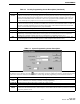
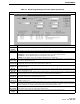
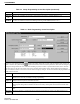
Table 3-3 Locality Programming Screen Description
This screen is used to create a new locality or edit a current locality. It is displayed by selecting the Edit > Localities
menu (see Section 3.6.8) or clicking one of the buttons in the toolbar. In general, a locality is a repeater site.
Parameter Description
Locality Name This is an eight-character name given to the locality to identify it during programming. It is not displayed by the transceiver.
Number The number from 1-1023 assigned to LTR-Net localities. Each LTR-Net locality that a mobile can access must have a differ-
ent locality number, and the same scheme must be used to program the mobiles and repeaters.
Type Selects the type of locality (LTR-Net, LTR, or Conventional) when new localities are created.
Band The frequency band in which the locality operates. The frequency band selected when the first locality is created or before
any localites are created by the Radio Type screen (see Section 3.6.2). Once a locality is created, the band cannot be
changed.
UID With LTR-Net localities, programs the unique ID of the mobile when it accesses that locality. Numbers from
1-65503 can be programmed.
Area “0” is usually programmed unless two LTR or LTR-Net localities are close enough to interfere with each other. One locality
is then programmed “0” and the other “1”.
Rx/Tx Base
Frequency
This is a non-editable field shown for reference only. It indicates the base receive and transmit frequency used to derive the
frequency of each channel.
Power Programs the power output that is selected when the transceiver accesses that locality. High, Low 1, Low 2, Low 3, and Low
4 levels can be selected. The power output for each of these levels is set during transceiver alignment (Section 2.5.12).
Dropout
Percentage
Programs the percentage that the squelch is tightened when no call is occurring. The higher the percentage, the sooner auto-
matic locality search occurs. The default value is 33%. If there is no other site nearby, this percentage should always be 0%
(Section 2.9.3).
Capture
Percentage
Programs the percentage that the squelch is tightened after the first pass when searching for a new site (“LCL SRCH” dis-
played). The higher the percentage, the stronger the signal must be in order to attempt registration on a site. This parameter
should always be greater than or equal to the preceding Dropout Percentage. The default value is 46% (Section 2.9.3).
Tight
Capture
Percentage
Programs the percentage squelch is tightened during the first pass when searching for a new site (“HSQ SRCH” displayed).
The higher the percentage, the stronger the signal must be in order to attempt registration on a site. This parameter should
always be greater than or equal to the preceding Capture Percentage. The default value is 80% (Section 2.9.3).
Display Mode With the 800/900 MHz bands, selects if Programming channel numbers or frequency (in MHz) is used to program the chan-
nel frequency of each repeater. With the UHF band, only channel frequencies can be used, so “Channel” is not selectable.
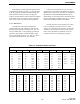
Channel numbers are shown in the table at the end of this section. It is possible to switch between the channel and frequency
display modes until a frequency is changed in the frequency mode.