
Product specifications





Page 24 of 150 198-1603-03 Rev 01
6. Operating Procedures
6.1. Front Panel Controls
6.1.1. Meters
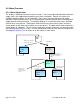
The meters display average current and average voltage. In addition to providing current and
voltage readings the meters can display menu names and other power supply settings. The
meters can show numeric parameter values or text messages.
6.1.1.1. Run Screens
Run screens are shown during normal supply operation. An example of a run screen is the
meters run screen which displays the output current and output voltage and allows for display and
edit of the current and voltage settings. Other examples of run screens include totalizer time, and
cycle time. The ‘SET’ lamp is off when a run screen is displayed.
6.1.1.2. Menus
Menus can be displayed to configure the power supply. The unit configuration menu contains
items that are generally only set when a power supply is initially installed. The setup menu
contains general cycle configuration such as RTC or ATC timed cycle control, output type (DC,
Pulse, or custom), ramp times, and current or voltage tolerances. The display select menu
provides a method to select which run screen is displayed. The ‘SET lamp is on steady when a
menu is displayed. The ‘SET’ lamp blinks on and off when a parameter value is displayed.
Setting/Menu
Indicator
Operate/Standby
Switch &
Indicator
Remote/Local
Switch & Indicator
Current Meter
Voltage Meter
Voltage
Encoder &
Indicator
Current
Encoder &
Indicator
Error / Status
Indicators