
User`s manual




8
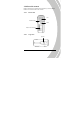
Shutter
button
In Movie/ Voice mode, press to
begin or stop recording.
In Photo mode, press to take a
photo.
In Movie/Voice Playback mode,
press to start or stop playback.
In Photo Playback mode, press to
switch to thumbnail view.
Macro
switch
Move the switch to the position
to enable Macro mode.
Playback
button
Press to enter playback mode.
Display/
Help
button
Press once to display all OSD icons.
Press again to turn all OSD icons off.
Press a third time to display help
diagrams, explaining all button
functions.
Scroll
wheel
In Movie/ Photo mode, move up
to zoom in, and down to zoom
out.
In Movie Playback/Voice
Playback mode, press inwards to
pause playback. Press again to
resume.
In Movie Playback/ Voice
Playback mode, move up/down
to adjust playback volume.