
Install Instructions


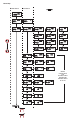
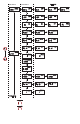
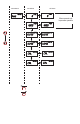

SETTING SET POINTS AND ALARMS
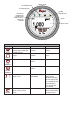
The hot key provides direct access to the Set Point and Alarm MENU. The Set Point and Alarm MENUS that are
displayed are based upon the Control (CtrL) SUB MENU.
SET POINT ADJUSTMENT
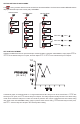
Adjusting the DH3 Set Points is quick and simple. Instead of setting a set point and deadband, simply adjust
SP1H
or
SP2H
for the desired relay turn on point, and then adjust
SP1L
or
SP2L
for the desired relay turn off point.
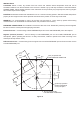
In the above graph, an instrument with a 1.0˝ range would have the SP1 relay turn on at 0.8˝ and off at 0.4˝.
SP1H
sets
the relay turn on point, and
SP1L
sets the relay turn off point. The relays outputs normally function in the direct acting
mode, which means the relays turn on with an increase in pressure. SP1 may be congured to act as a reverse acting
relay (refer to the 1SP SUB MENU setting, page 15). When set for reverse acting,
SP1H
sets the relay turn OFF point,
and
SP1L
sets the relay turn ON point. SP2 is always direct acting.
SP/AL
SP/AL SP/AL
SP/AL
SP/AL SP/AL
SP/AL
SP/AL
SP/AL
SP/AL SP/AL
SP/AL
SP/AL
SP/AL
Visible when
Visible when
Visible when
mode =
mode =
mode =
CONTROL MODE
CONTROL MODE
CONTROL MODE
PRES
SURE
0
0
TIME
0.2
0.4
0.6
0.8
1.0
(in. w.c.)