
Install Instructions


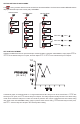

INWC
1.000
SP1
SP2
ALHI
ALLO
SP/AL
RST
MENU
E
X1K
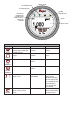
FRONT PANEL
ALARM
DESCRIPTOR
UNITS
INPUT VALUE
MULTIPLIER
DESCRIPTOR
VISABLE WITH
SOME VELOCITY
AND FLOW
RANGES
SP2 DESCRIPTOR
SP1 DESCRIPTOR
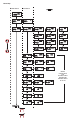
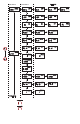
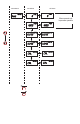
KEY FUNCTIONS
Keys Home Position Function Main Menu Function Sub Menu Function
SP/AL
Sequences the display
through SET POINT and
ALARM settings
Return to home
position
Return to home
position
MENU
Allows access to the
menus
Return to home
position
Return to previous
menu
UP
ARROW
Sequences through
menus
Increments a value
DOWN
ARROW
Sequences through
menus
Decrements a value
ENTER
Displays full scale
range of unit
Enter into
SUB MENU
Changes a value or
setting. Press
ENTER and display
will blink. Adjust with
UP or DOWN arrows.
Press ENTER to
store. Display will
stop blinking.
RESET
Clears or resets an Alarm
(alarm set for manual
reset)
Peak/Valley SUB
MENU resets display
to present value.
SP/AL
E
MENU
RST