
Install Instructions

ArEA
,
DIA
,
XDIM
and
YDIM
SUB MENUS
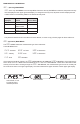
These SUB MENUS become accessible if the instrument is set for ow. When measuring ow, the area of the duct
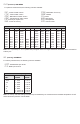
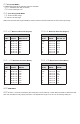
must be specied. Tables 3 and 4 show the input range vs maximum ow and duct size. For a rectangular duct the
maximum size is specied in square feet or meters. For a circular duct the maximum size is specied as the diameter.
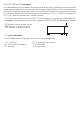
X, Y and circular dimensions are entered in feet with 0.01 foot resolution for
FLOr
=
LO
and 0.1 foot resolution for
FLOr
=
HI
, or entered in millimeters with 1 millimeter resolution.
ArEA
- Area, select
CIR
for a circular duct or
RECT
for a rectangular duct. If a circular duct is selected, the
DIA
SUB MENU will be activated. If a rectangular duct is selected, the
XDIM
and
YDIM
SUB MENUS will be activated.
DIA
- Diameter, enter the diameter of a duct
XDIM
- Enter the “X” dimension of a duct
YDIM
- Enter the “Y” dimension of a duct
OUt
(Output) MAIN MENU
The
OUt
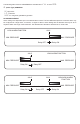
MENU selects the output type of the instrument. The SUB MENUS are:
CtrL
- Control type
ALrE
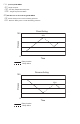
- Alarm reset, manual or auto
ISP
- SP1 reverse or direct acting
AL.H
- Alarm inhibit
AL
- Alarm type
ALDL
- Alarm delay
X
Y