
User guide




DevCom2000 User Manual
MAN-1010 7/19/2010 Our Quality Management System is Page 26
ISO 9001:2008 Certified
Step Action
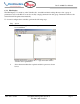
Expand the menu by clicking the “+” sign and double-click to
view the device parameters.
2 Select the menu where the method is present and double-click to
execute it.
3 Below is an example of a Method dialog box:
4 Click OK to move to the next dialog in the Method sequence.
5 Or, click Abort to cancel the Method execution.
6 Click Help to get specific help for that step of the Method. This