
Specifications



English
CreatingICEentry(InCaseofEmergency)
Withthisadditionalinformationandmedicalinformation,rst
responderscanaccessthisinformationfromthevictim'sphonein
caseofemergency.Intheeventofatrauma,itiscriticaltohavethis
informationasearlyaspossiblewhichcanincreasethechancesof
survival.Alleldsareoptional,butthemoreinformationprovidedthe
better.SeeICE(InCaseofEmergency)
,p.13onhowtocongure
yourICEinformation.
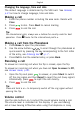
Managingphonebookentries
1.PressMenu,scrollto
andpressOK.
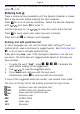
2.SelectacontactandpressOptions.
3.SelectoneofthefollowingoptionsandpressOK.
View
Showdetailsfortheselectedcontact.
Edit
1.Use
/ tomovethecursor.DeletewithClear.
2.PressSave.
Add
SeeCreatingaphonebookentry,p.11.
Call
PressOKtocallthecontact.
SendSMS
PressOKtowriteaSMSmessage,seeCreatingandsendingSMS,
p.14.
Delete
PressOKtodeletetheselectedphonebookentry.PressYestoconrm
orNotoabort.
Deleteall
SelectFromSIMorFromphoneandpressOKtodeleteallphonebook
entriesfromtheSIMcardorphonememory.
12