
Product manual

DMX Monitor
The DMX Monitor displays the current values that are being sent to the output universes. Only
those channels are displayed that have actual fixtures behind them. The monitor's display
options have no effect on actual fixture addressing, after all, it is just a monitor.
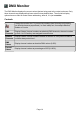
Controls
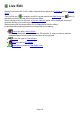
Change the monitor font. To prevent the numbers from flickering and jumping,
you should choose a proportional (i.e. fixed width) font; for example Monaco,
Andale or Courier.
DMX
Channels
Display fixtures' channel numbers as absolute DMX channels; channel numbers
go from 1 to 512 as they are assigned to each fixture.
Relative
Channels
Display fixtures' channel numbers relative to fixtures i.e. every fixture's channel
numbers always start from 1.
DMX
Values
Display channel values as absolute DMX values (0-255).
Percent
Values
Display channel values as percentages of 255 (0-100%).
Page 14