
Product manual
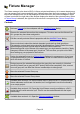

Toggle full screen mode
View this documentation
View information about QLC+
DMX Dump
Live Edit: allows you to modify a function while QLC+ is in Operate Mode
Stop All Functions
Toggle Blackout
Switch between Design Mode and Operate Mode
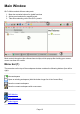
Active Panel (2)
Everything happens here. What panel is active depends what tab is currently selected.
Panel Tabs (3)
At the bottom of main window you can find how to switch between QLC+ panels with easy eye
catching icons that appear as follows (from left to right):
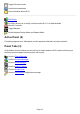
View the Fixture Manager
View the Function Manager
View the Show Manager
View the Virtual Console
View the Simple Desk
View the Input/Output configuration manager
Page 13