
Product manual

Main Window
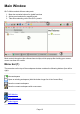
QLC+ Main consists of three main parts:
1. Menu bar contains buttons for global functions
2. Active panel selected by respective tab
3. Tabs allow selecting one of the QLC+ panels
Most controls throughout the software have tooltips, which pop up after holding your mouse
cursor over them for a while.
Menu bar (1)
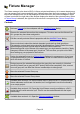
The menu bar on the top of the workspace window contains the following buttons (from left to
right):
New workspace
Open an existing workspace (hold the button longer for a list of recent files)
Save the current workspace
Save the current workspace with a new name
DMX Monitor
DMX Address tool
Audio triggers
Page 12